Rewriting Excel, PowerPoint, and Word for Agents
How we calculate and print Excel workbooks, and render PowerPoint and Word files, the way Office does on servers with no Office installed
by Compound Team · October 23, 2026 · 11 min read
Financial analysts work in Excel, PowerPoint and Word, so an AI analyst has to as well. When a Compound agent builds a model, updates a deck or writes an IC memo, it opens the real .xlsx, .pptx or .docx, edits it, recalculates it, and then looks at a picture of the result to check its own work, the way an analyst glances at a page before sending it. That last step matters more than it sounds. An agent that cannot see a wrong total, a chart label running off the slide, or a table pushed onto a second page, will ship it.
All of this happens headless: on servers with no screen, no desktop and no copy of Microsoft Office installed. So we rewrote the parts of Office that our agents need, as libraries that a program can call:
- A spreadsheet engine, written in Rust, that loads, calculates, saves and prints Excel workbooks.
- A document engine, written in Rust, that lays out and draws PowerPoint and Word files to PNG and PDF.
We built both engines in about eight months, using about a trillion LLM tokens.
The same two engines run in your browser. The spreadsheet viewer in Compound calculates with the spreadsheet engine, and the slide and document viewers are the document engine compiled to WebAssembly, drawing through the same rasterizer the servers run. What the agent checks is, pixel for pixel, what you see.
This post shows how close those engines get to Microsoft Office, and how they compare with LibreOffice, the open-source office suite that most server-side document pipelines run headless, and with Google Workspace. LibreOffice is version 26.8.1, the current release, converting to PDF headless. For Google, we uploaded each file to Google Drive in October 2026, let Google convert it to Sheets, Slides or Docs, and exported it to PDF. In each comparison the first image is Microsoft Office’s own output, and every renderer was given the same file.
Excel: the right numbers, formatted the way Excel shows them
A workbook has to look the way Excel shows it, on screen and in print: number and accounting formats, fonts, indents, borders and page breaks. And every number has to match what Excel would compute, on workbooks with hundreds of thousands of formulas, fast enough that an agent can recalculate after each edit.
Our spreadsheet engine implements 477 Excel functions, including dynamic arrays (FILTER, SORT, UNIQUE, SEQUENCE), LET and LAMBDA, XLOOKUP, regular expressions, and GROUPBY and PIVOTBY.
Formula parity
We check it against values Excel itself computed:
- Every function, once. On a workbook that calls each Excel function, Compound matches Excel’s stored result on 873 of 874 formulas. The one difference is
INFO("osversion"), which reports the operating system. - Real workbooks. On 22,523 public workbooks from the Sheetpedia corpus, 148.9 million formula cells, 98.5% of Compound’s results are bit-for-bit identical to Excel’s.
- Where LibreOffice and Excel disagree. Across 22,485 of those workbooks, LibreOffice 26.8.1 disagreed with Excel on 17.1% of formula cells, and 47% of workbooks had at least one disagreement. The largest group is references to other workbooks, which neither can open: Excel returns
#REF!or#N/A, LibreOffice#NAME?. Where a disagreement starts, in a cell that does not just inherit another cell’s wrong value, Compound gives Excel’s answer 94% of the time.
Newer Excel functions
Analysts now build models with dynamic arrays, LAMBDA and GROUPBY. We wrote one workbook that calls 50 of the newer functions and operators in 63 formulas, had Excel compute and save it, and then recalculated it in Compound and in LibreOffice 26.8.1.
Compound matches Excel on all 63 formulas. LibreOffice matches on 39, and on only 17 when the same formulas are in a file that Excel has not saved, which is what an agent writing a workbook with a library produces.
LibreOffice now computes FILTER, SORT, UNIQUE, XLOOKUP, LET, TEXTSPLIT and the stacking functions correctly. It cannot compute:
LAMBDAand its helpers.LAMBDA, and a namedLAMBDAsuch as=Margin(10,7), returnErr:509.MAP,REDUCE,SCAN,BYROW,BYCOLandMAKEARRAYreturn#NAME?.- Summaries.
GROUPBY,PIVOTBYandPERCENTOFreturn#NAME?. - Regular expressions.
REGEXTEST,REGEXEXTRACTandREGEXREPLACEreturn#NAME?. - Spill references.
SUM(B5#), which refers to a whole spilled range, and the@operator return#NAME?.
The quieter problem is resizing. LibreOffice keeps each dynamic array at the size Excel last saved. When we changed one input so that FILTER should return four rows, Excel and Compound returned four; LibreOffice still showed three and dropped the fourth without an error. In a workbook written by a library instead of saved by Excel, every spilling formula shows only its first value. An agent that edits a model and reads it back would get a wrong answer and no warning.
Speed
We time Compound on generated workbooks of a few hundred to 1.6 million formulas that stress one pattern each: long dependency chains, wide fan-out, lookups, SUMIFS, text functions, cross-sheet references, financial functions, and a realistic mix. Excel’s times for the same files come from Excel 16 on Windows, driven over COM.
Across all 66 workbooks, Compound opens files 11 to 35 times faster than Excel (geometric mean, depending on the set), recalculates a whole workbook 1.2 to 2.5 times faster, and recalculates after a one-cell edit 2.3 times faster. Excel is still faster on some patterns, mainly large exact-match lookups, volatile RAND sheets and workbooks with hundreds of sheets, and those are on our list.
The Excel times were recorded on different hardware from Compound’s, a Windows virtual machine on a Mac, so read the ratios as a guide rather than a race.
Printing to PDF
Analysts send a model to a partner or a client as a PDF, so the printed page has to look like the one Excel prints. Here the reference is Excel’s own print to PDF; Compound and LibreOffice 26.8.1 each converted the same workbook headless.
An income statement
Accounting formats pin the $ to the left edge of the cell, and line items are indented under their totals. Compound places both the way Excel does and prints the footer in the workbook’s font. LibreOffice drops the indents, so the line items no longer read as parts of a total. Google Sheets also drops the indents, and prints no footer.
Where the page breaks
Page 2 of a twelve-page ledger. Excel decides which columns fit on a page from the column widths and the font. Compound makes the same decision. LibreOffice fits one more column, the cash balance, on this page, so its pages break in different places from Excel’s.
Printing errors
This workbook’s page setup tells Excel to print error values as --. Compound follows the setting. LibreOffice ignores it and prints #DIV/0!, #N/A and its own Err:502. Google Sheets also prints the raw errors, and adds gridlines that Excel does not print.
Why PowerPoint and Word are hard to render
For a workbook, most of the work is calculating it. For PowerPoint and Word, the hard part is drawing the file.
The Office Open XML standard that defines .pptx and .docx runs to about 5,000 pages, and it still does not say what a file looks like. Much of what you see on a slide is not in the file at all:
- A chart stores its data and a style number. Its colors come from the document’s theme through a color-cycling table, and its axis range comes from Office’s own auto-scaling rules.
- A text box set to shrink text on overflow stores the font size Office last computed. Lay the text out with slightly different font metrics and the line breaks move.
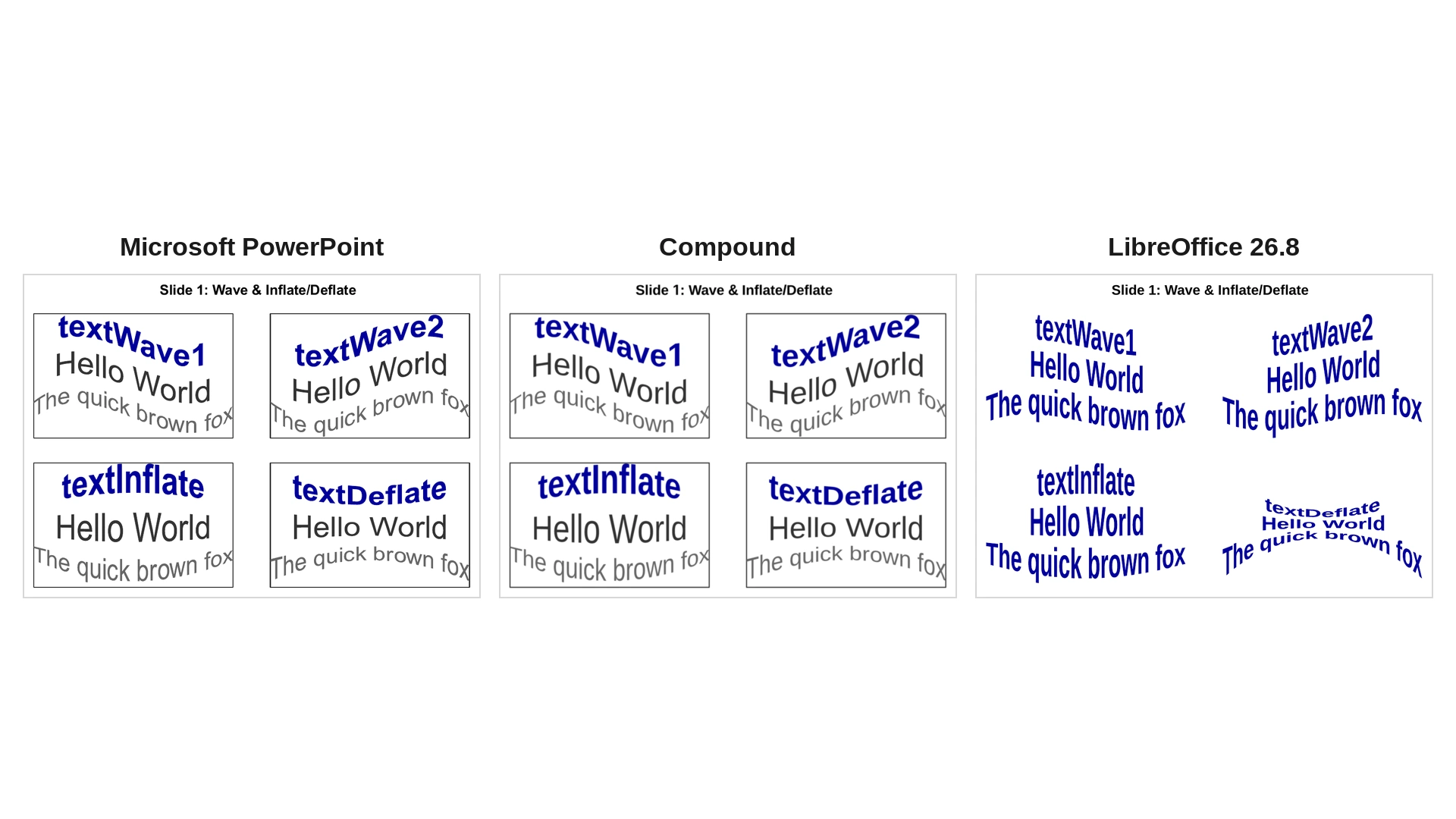
- Text warps such as Wave or Curve Up are named presets. The file says
textWave1; the geometry that bends the text is defined by Office. - SmartArt stores a data model and a layout definition, and leaves the renderer to run the layout algorithm.
Getting these right means matching what Office does, not what the standard says. So we use Microsoft Office as the reference. Every file in our test corpus has been rendered by Office itself, through Microsoft Graph, and every change to our document engine is scored against those renders before it merges.
PowerPoint
LibreOffice is also how Claude checks the slides it makes: its PowerPoint skill builds decks with the PptxGenJS library and renders them with LibreOffice to look at the result.
Text warps
The image at the top of this post and this slide use ordinary text in ordinary text boxes; only the warp preset differs. Compound bends each line along the same path as PowerPoint and keeps the box outlines. LibreOffice drops the outlines, condenses the text and applies its own version of each warp. Google Slides ignores the warps altogether: every line is straight, and the outlines are gone too.
Peer benchmarking bars
A slide from a deck one of our agents built for a fictional deal. Each bar ends in a short data label. PowerPoint and Compound measure the label with the same font metrics and fit it on one line. LibreOffice breaks every label after “XX”, so all twelve labels spill onto a second line. Google Slides imports the chart as a low-resolution picture, so the labels blur and the bars gain outlines.
A bubble chart
The file does not store the axis range; PowerPoint computes it from the data. Compound computes the same range, so every bubble lands in the same place on the grid. LibreOffice picks a different range, which shifts the bubbles and changes the gridlines. Google Slides shrinks the bubbles, sets the axes to 0 to 12 and clips the labels.
A pie-of-pie chart
A custom split moves three of the six categories to the second pie. Compound draws both pies at PowerPoint’s size and position, with the same split and colors. LibreOffice moves only two categories to the second pie, shrinks both pies, and adds connector lines that PowerPoint does not draw. Google Slides cannot import the chart and leaves an empty box in its place.
A chart, a table and a bulleted list
A slide built with our own presentation API: a bar chart, an empty table and a bulleted list with a nested item and a custom arrow bullet. Compound matches PowerPoint on the chart title’s size, the legend inside the plot area and the bullet indents. LibreOffice draws the chart title about twice as large, moves the legend below the axis and shifts the nested bullet away from its text. Google Slides drops the table and misaligns the bullets.
A chart with a data table
A column chart with a data table under the plot. Compound draws the table with cell borders and a colored legend key on each series row, as PowerPoint does. LibreOffice prints the numbers with no grid and no keys, and adds a separate legend below. Google Slides drops the data table altogether.
An axis in millions
The file stores 4,200,000, and the value axis is set to show millions, so PowerPoint labels it 0 to 8 with a “Millions” title. Compound applies the display unit the same way. LibreOffice ignores it and labels the axis 0 to 8000000, with no units label. Google Slides scales the axis to 0 to 8 but drops the “Millions” title, and the slide title with it.
Empty placeholders
A title slide whose title and subtitle placeholders were left empty. PowerPoint draws only the layout’s rule line, and so does Compound. LibreOffice prints the layout’s prompt text, “Click to edit Master title style” and “Click to edit Master text styles”, into the PDF, and adds a slide number. Google Slides draws only the rule, as PowerPoint does.
Shape effects
Three rectangles with one effect each: a soft blur, a color fill overlay and an inner shadow. Compound draws all three as PowerPoint does. LibreOffice drops all three and draws plain blue rectangles. So does Google Slides.
Word
Fonts and line breaks
Each paragraph of this page is set in a different typeface: Aptos, Georgia, Garamond, Century Gothic, Segoe UI and Consolas. Compound draws each one in its own face with the same advance widths as Word, so every line ends on the same word. LibreOffice, running on a server without these fonts, substitutes one serif face for all of them; the paragraphs grow wider and every line breaks somewhere else. Google Docs has most of these faces but substitutes another sans-serif for Aptos, and its lines break in different places from Word’s.
Charts inside Word documents are where LibreOffice and Google Docs struggle most. These documents were authored in desktop Word.
A doughnut chart
Three data series drawn as three thin rings. LibreOffice draws thick rings around a small hole, so it no longer reads as the chart the author made. Google Docs draws a single thick ring, titled North, for one of the three series.
A filled radar chart
Three filled series on a scale to 25. LibreOffice sets the scale to 40, and only one of the three series is visible. Google Docs sets the scale to 30, drops the title and puts the legend over the Q1 label.
A surface chart
LibreOffice draws a 3D column chart instead of a surface. Compound draws the surface with Word’s five color bands, its value axis and the gridlines on both walls. Google Docs flattens it into a contour map.
How close, across the whole corpus
Hand-picked examples show the kind of difference; they do not show how often it happens. So we scored every page of our render test corpus against Office’s own render with SSIM, a standard measure of structural similarity between two images where 1.0 means identical.
The corpus has 82 PowerPoint decks and 373 Word documents, from synthetic test files to real decks and memos, and we scored every page Office rendered for it, up to 30 per file: 1,708 pages in all. Every engine’s output was scaled to the same 800-pixel width before scoring.
| PowerPoint pages | Mean SSIM | Pages at 0.9 or better | Word pages | Mean SSIM | Pages at 0.9 or better | |
|---|---|---|---|---|---|---|
| Compound | 909 | 0.940 | 86% | 799 | 0.948 | 89% |
| LibreOffice 26.8 | 909 | 0.886 | 45% | 799 | 0.848 | 56% |
Compared page by page, Compound is closer to Office than LibreOffice is on 677 PowerPoint pages and 595 Word pages; LibreOffice is closer on 52 and 31.
Why this matters for agents
An agent checks its work many times in one task: after it changes an assumption, after it builds a chart, after it adds a slide. That only works if checking the file is cheap and the answer is right.
- The same answers as Excel. An agent that recalculates a model and reads back a number gets the number Excel would show, without a round trip to Excel.
- Fast enough to look after every edit. Compound converts a typical deck to PDF in 25 to 110 milliseconds and a Word document in under 100. LibreOffice, started headless for each file, took 1.2 seconds for a Word document and 2.8 seconds for a deck in our tests.
- Headless: no Office, no desktop. The engines run as ordinary services in our own clusters, with no Windows machines, no Office licenses and no browser. Each document is rendered in a process locked down with a system-call filter, so a malicious file cannot reach the rest of the machine.
- The same pixels as the user. The viewer in Compound runs the same engine compiled to WebAssembly. When an agent decides a slide looks right, it is looking at what you will see.
Rewriting Office is a long project. Every difference from Office that we close makes every agent that uses these files a little more reliable, and we measure every step against Office itself.